
Adobe · 2026-09-08 · major
Premiere's Generative Media Tool — five AI video models in the timeline
Adobe's Generative Media Tool puts video and sound generation inside the Premiere timeline, with a choice of Adobe Firefly, Google Veo, Kling, Runway or Luma. Draw a range on a track, describe the shot, and generate without leaving the app.
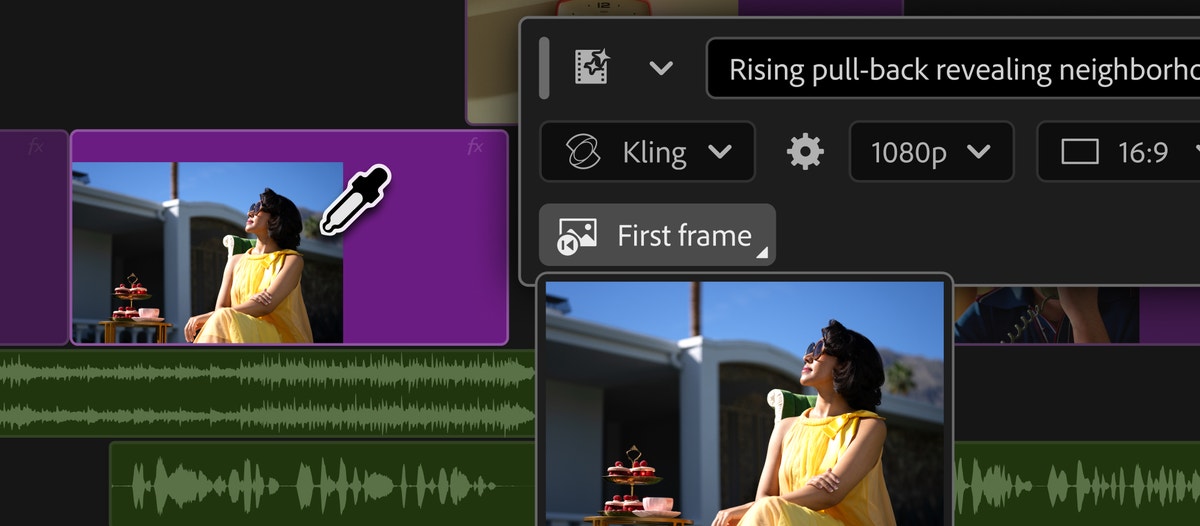
Premiere editors can now generate clips and sound effects on the timeline itself, choosing between Adobe's model and four rivals.
Quick facts
| Maker | Adobe |
|---|---|
| Announced | September 8, 2026, ahead of IBC 2026 |
| Models available | Firefly, Google Veo, Kling, Runway, Luma |
| Shipping now | Generate Video, Generate Sound Effects |
| Public beta | Generate Music, Generate Soundscape |
| After Effects | AI Assistant in public beta |
| Cost | Firefly credits, varies by model |
What is it?
The Generative Media Tool ships in Premiere this week at IBC 2026 and removes the round trip to a separate generator. An editor draws a range on any track, types what the shot needs, and picks which model makes it — Adobe Firefly, Google Veo, Kling, Runway and Luma all sit behind the same control. Generate Sound Effects runs on Adobe's own commercially safe audio model.
How does it work?
Generation is anchored to the timeline range, so the clip comes back at the right length and lands in the right place in the sequence. Credit use depends on which model is chosen, and the cost for the current model and settings appears in the taskbar before the editor commits.
Why does it matter?
Adobe is competing on workflow rather than model quality. A post team that today exports a shot list, generates elsewhere and re-imports gets that whole loop collapsed into one panel, and can switch models shot by shot without leaving the edit. After Effects gets a matching natural-language assistant in public beta, and Frame.io Mounted Storage opens to all accounts.
Who is it for?
video editors and post-production teams
Frequently asked questions
- How much does generating a clip in Premiere cost?
- Adobe's Generative Media Tool spends Firefly generative credits, and how many depends on the model chosen. Premiere shows the credit cost for the selected model and settings in the taskbar before the editor commits to a generation, so the price is visible ahead of the render rather than after it.
- Which parts are shipping and which are still beta?
- Generate Video and Generate Sound Effects are in the shipping Premiere release from IBC 2026. Generate Music and Generate Soundscape are public beta, as are the audio tools Enhance Audio, Separate Crosstalk and Dynamic Auto Ducking, the new speed algorithm for duration changes, and a Color Mode with Vignette and Midtones style modules plus a one-click Auto Color tool.
- What does After Effects get in this release?
- After Effects gains an AI Assistant in public beta that puts a natural-language layer over native project operations, so an editor can describe a change instead of clicking through panels. Adobe announced it on September 8, 2026 alongside the Premiere Generative Media Tool, ahead of the IBC 2026 conference in Amsterdam.
Try it
Update Premiere Pro, then open the Generative Media Tool from the toolbar.